Zero-Code Sharding: Scaling MySQL Reads with ProxySQL
Dev Joshi
Lead DevOps Architect
There are three database scaling concepts:
- Sharding: Splitting data into multiple servers.
- Replication: Keeping same data in different servers.
- Partitioning: Creating partition of data in same table.
This guide focuses on Sharding in MySQL only. There are two ways sharding can be achieved, one is using Application logic, and One is using Infra level Logic.
Application logic gives us more flexibility but makes the Application heavy while Infra level gives us less flexibility but is very easy to implement. For this guide, we will use Infra level sharding technique known as ProxySQL.
ProxySQL works as a proxy between the Application and database. The Application thinks that it’s talking to one large database but in reality there are multiple servers sitting behind ProxySQL.
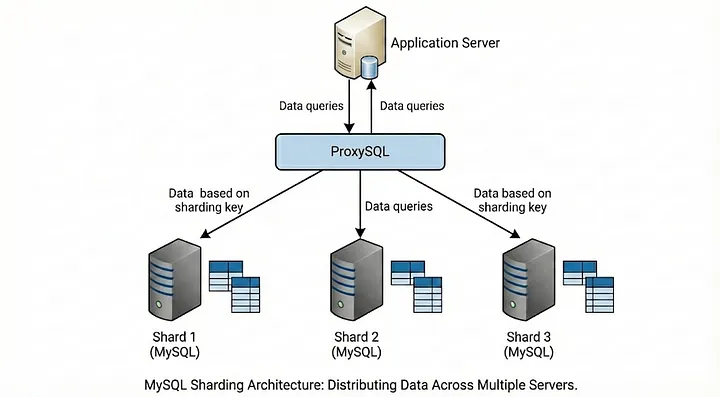
ProxySQL uses two main concepts to drive the magic:
- Hostgroups(HG): These are the logical buckets which separates our servers.
- Query Rules: This is the Brain of ProxySQL, it uses Regex to inspect incoming SQL. For e.g. ProxySQL looks at a query like
SELECT * FROM users WHERE id = 5remembers that IDs 1–1000 live in HG 1 and routes the query there.
Let’s first understand the logic behind how we split the data. There are two methods of logic behind sharding:
-
Range Based sharding: This is the most common method of sharding. In this method, we split data based on pre-defined intervals of sharding key such as
user_idorcreation_date- ID 1 to 10000 sits in Server A
- ID 10001 to 20000 sits in Server B
This type of sharding is very easily implemented but the main problem here is that if your application is like Instagram where new users are most active, server B will get hammered while server A will sit idle.
-
Hash Based Sharding: Here we take a shard key and run it through a hash function or a simple modulo operator and the result determines the server.
Let’s say our logic is
id%2determines the server:- If result is 0 i.e. id is even, it goes to Server A
- If result is 1 i.e. id is odd, it goes to Server B
This strategy may seem good initially due to even distribution of data but we need to remember that this strategy is very math heavy and re-sharding in case of even larger data becomes very complex because we need to change the hashing logic later on.
Hash is basically a digital footprint for any piece of data(text, file, password, etc.) it’s a fixed-length string of characters produced by a one-way mathematical process called a hash function.
Let’s setup a sharding playground with 3 containers:
mysql-shard1mysql-shard2proxysql
Use the following docker-compose.yaml to start these three containers:
version: '3.8'
services:
 # - - - - - - - - - - - - - - -
 # SHARD 1 (The Odd Bucket)
 # - - - - - - - - - - - - - - -
 mysql-shard1:
   image: mysql:8.0
   container_name: mysql-shard1
   environment:
     MYSQL_ROOT_PASSWORD: root
     MYSQL_DATABASE: my_app_db
   ports:
     - "3307:3306"
 # - - - - - - - - - - - - - - -
 # SHARD 2 (The Even Bucket)
 # - - - - - - - - - - - - - - -
 mysql-shard2:
   image: mysql:8.0
   container_name: mysql-shard2
   environment:
     MYSQL_ROOT_PASSWORD: root
     MYSQL_DATABASE: my_app_db
   ports:
     - "3308:3306"
 # - - - - - - - - - - - - - - -
 # THE BRAIN (ProxySQL)
 # - - - - - - - - - - - - - - -
 proxysql:
   image: proxysql/proxysql:2.5.5
   container_name: proxysql
   ports:
     - "6033:6033" # The Traffic Port (App connects here)
     - "6032:6032" # The Admin Port (We configure rules here)
   depends_on:
     - mysql-shard1
     - mysql-shard2
Now let’s try to connect to ProxySQL. The issue here is that, we can’t connect to ProxySQL from outside so we need to have another container on the same network as ProxySQL container so we will spring up another container on the same network:
docker run -it --rm --net=container:proxysql mysql:8.0 mysql -u admin -padmin -h 127.0.0.1 -P 6032 --prompt='ProxySQL Admin> '
Now, you should see the ProxySQL Admin> prompt.
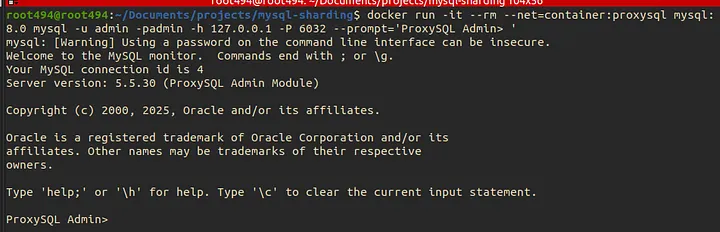
We now need to tell proxySQL about our two database servers. We will group them into Hostgroups(HG)
- HG 10: Will hold shard 1 (Odd IDs)
- HG 20: Will hold shard 2 (Even IDs)
Now, run the following SQL Commands inside the admin prompt:
-- 1. Add the "Odd" Shard to Hostgroup 10
INSERT INTO mysql_servers (hostgroup_id, hostname, port) VALUES (10, 'mysql-shard1', 3306);

-- 2. Add the "Even" Shard to Hostgroup 20
INSERT INTO mysql_servers (hostgroup_id, hostname, port) VALUES (20, 'mysql-shard2', 3306);

-- 3. Load these changes into memory
LOAD MYSQL SERVERS TO RUNTIME;
-- 4. Save them to disk (so they survive a restart)
SAVE MYSQL SERVERS TO DISK;
-- 5. Verify they are registered
SELECT hostgroup_id, hostname, status FROM mysql_servers;
The last command will give you the status of the hostgroups, you should see online in both the hostgroups.
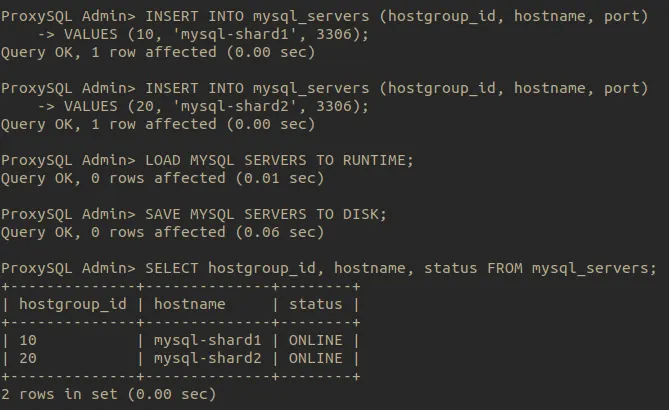
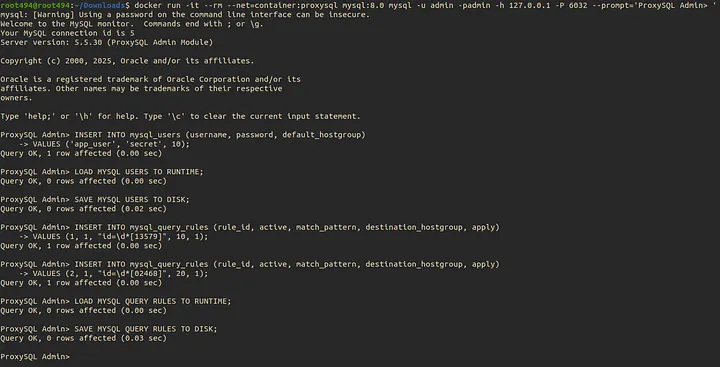
Now, let’s teach ProxySQL how to think.
To achieve this, we need to do two things:
- Create a user: ProxySQL needs a user credential to accept traffic from the app and to talk to the database shards
- Create the Rules: We need to give the logic using which ProxySQL will shard the data. For this guide, we are going to use odd/even logic meaning even IDs go to Shard1 and odd IDs go to Shard2.
Step-1: Create the Application User:
We will create a user named app_user. ProxySQL will use this to connect to the backend MySQL servers. Run the following in ProxySQL admin:
-- 1. Create the user in ProxySQL's memory
INSERT INTO mysql_users (username, password, default_hostgroup)
VALUES ('app_user', 'secret', 10);
-- Why? default_hostgroup=10 means "if no rules match, send traffic to Shard 1".
-- It acts as a safety net.

-- 2. Load to runtime and save
LOAD MYSQL USERS TO RUNTIME;
SAVE MYSQL USERS TO DISK;
Step-2: Implement the Sharding logic:
ProxySQL uses Regex to route traffic. We will look at queries that contain id = x and check if the last digit is even or odd.
- HG 10 = Shard 1 (Odd IDs: 1,3,5,…)
- HG 20 = Shard 2 (Even IDs: 0,2,4,…)
Run the following commands in ProxySQL to create the same logic:
-- Rule 1: Route Odd IDs to Hostgroup 10
-- Regex matches "id =" followed by any digits, ending in 1, 3, 5, 7, or 9
INSERT INTO mysql_query_rules (rule_id, active, match_pattern, destination_hostgroup, apply)
VALUES (1, 1, "id\s*=\s*\d*[13579]", 10, 1);

-- Rule 2: Route Even IDs to Hostgroup 20
-- Regex matches "id =" followed by any digits, ending in 0, 2, 4, 6, or 8
INSERT INTO mysql_query_rules (rule_id, active, match_pattern, destination_hostgroup, apply)
VALUES (2, 1, "id\s*=\s*\d*[02468]", 20, 1);

-- Load rules
LOAD MYSQL QUERY RULES TO RUNTIME;
SAVE MYSQL QUERY RULES TO DISK;
Step 3: Adding the insert rules
In a real world, we want our application to be de-coupled. Meaning, they don’t need to know or shouldn’t care if there are 2 or 200 shards. We ask proxy SQL to create Insert Rules like this:
Let’s assume that the Insert query looks something like:
INSERT INTO users (id, name) VALUES (3, 'Charlie');
To setup an insert rule in ProxySQL run the following commands in ProxySQL Admin:
-- Rule 3: Odd IDs
INSERT INTO mysql_query_rules (rule_id, active, match_pattern, destination_hostgroup, apply)
VALUES (3, 1, "^INSERT.*VALUES.*[0-9]*[13579].*[,)]", 10, 1);

-- Rule 4: Even IDs
INSERT INTO mysql_query_rules (rule_id, active, match_pattern, destination_hostgroup, apply)
VALUES (4, 1, "^INSERT.*VALUES.*[0-9]*[02468].*[,)]", 20, 1);

-- Load them up
LOAD MYSQL QUERY RULES TO RUNTIME;
SAVE MYSQL QUERY RULES TO DISK;
The benefit of setting up a write rule is that:
- The App stays decoupled: It doesn’t need to know any logic about sharding or number of shard servers.
- Zero downtime migration: We can change the sharding rules on the fly without redeploying the application code.
Why this doesn’t work in real-life? While the above given Insert Regex works for this POC, routing production query through ProxySQL has its limitations:
- Parameter Order: If query’s parameter order changes, the regex will break because it expects number first.
- Bulk Inserts: If one row is odd and next is even, ProxySQL cannot split a single query into two servers. It will send the whole query to one server, causing data consistency issues.
For messy, bulk or dynamic queries, Application-level sharding is generally safer.
Step 4: The Missing Link : Data is not present in any shards
We configured ProxySQL but we haven’t actually created any data on the actual MySQL containers yet. Let’s try to setup the actual database containers with data:
Exit the ProxySQL Admin interface and run the following on Shard 1 and Shard 2:
1. Setup Shard 1 (Odd):
Login to Shard 1 MySQL:
docker exec -it mysql-shard1 mysql -u root -proot my_app_db
Now paste the following command to create a user, database, table and insert into the created table:
CREATE USER 'app_user'@'%' IDENTIFIED BY 'secret';
GRANT ALL PRIVILEGES ON my_app_db.* TO 'app_user'@'%';
CREATE TABLE users (id INT PRIMARY KEY, name VARCHAR(50));
2. Setup Shard 2 (Even):
Login to Shard 2 MySQL:
docker exec -it mysql-shard2 mysql -u root -proot my_app_db
Now paste the following command to create a user, database, table and insert into the created table:
CREATE USER 'app_user'@'%' IDENTIFIED BY 'secret';
GRANT ALL PRIVILEGES ON my_app_db.* TO 'app_user'@'%';
CREATE TABLE users (id INT PRIMARY KEY, name VARCHAR(50));
⚠️ Important Note: We strictly define INT PRIMARY KEY without AUTO_INCREMENT. In a sharded setup, if both servers use auto-increment, they will both generate ID 1, 2, 3… causing duplicate ID collisions. In production, use UUIDs or offset-based increments.
3: Insert Records
Connect to ProxySQL traffic port using:
docker run -it --rm --net=container:proxysql mysql:8.0 mysql -u app_user -psecret -h 127.0.0.1 -P 6033 --default-auth=mysql_native_password
Insert the data into both shards:
-- Use the original Database
USE my_app_db;
-- 1. Odd -> Shard 1 (HG 10)
INSERT INTO users (id, name) VALUES (1, 'Kieran');
INSERT INTO users (id, name) VALUES (3, 'Liam');
INSERT INTO users (id, name) VALUES (5, 'Noah');
INSERT INTO users (id, name) VALUES (7, 'Olivia');

-- 2. Even -> Shard 2 (HG 20)
INSERT INTO users (id, name) VALUES (2, 'Mia');
INSERT INTO users (id, name) VALUES (4, 'Nora');
INSERT INTO users (id, name) VALUES (6, 'Peter');
INSERT INTO users (id, name) VALUES (8, 'Quinn');
Moment of truth: Let’s see the magic happening.
We will connect to ProxySQL as the app_user and run queries. ProxySQL should automatically fetch data from different servers based on the ID we ask for. Let’s connect to ProxySQL using the following:
docker run -it --rm --net=container:proxysql mysql:8.0 mysql -u app_user -psecret -h 127.0.0.1 -P 6033 --default-auth=mysql_native_password
Now once you’re logged into the MySQL CLI, please switch the db to the one we created earlier:
USE my_app_db;
After selecting the DB, run the sharding test to check the data:
SELECT * FROM users WHERE id=1;
SELECT * FROM users WHERE id=2;
id=1(Odd ID) should successfully fetch Kieran from Shard 1 (Hostgroup 10).id=2(Even ID) should successfully fetch Mia from Shard 2 (Hostgroup 20).
To confirm whether this is as expected or not, let’s login to individual shards and check the data:
Shard1 should have Kieran but not Mia:
docker exec -it mysql-shard1 mysql -u root -proot my_app_db
Now, let’s check the IDs:
SELECT * FROM users WHERE id=1;
SELECT * FROM users WHERE id=2;
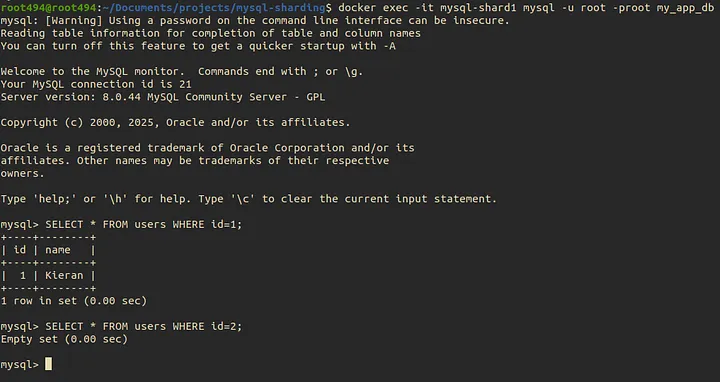
While shard2 should have Mia but not Kieran:
docker exec -it mysql-shard2 mysql -u root -proot my_app_db
Now, let’s check the IDs:
SELECT * FROM users WHERE id=1;
SELECT * FROM users WHERE id=2;
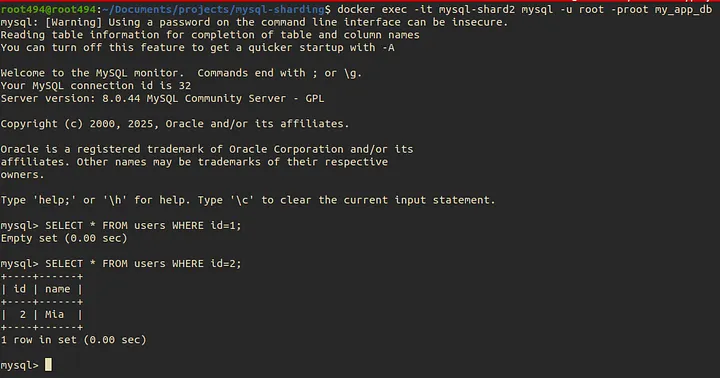
We’ve successfully built a basic yet powerful ProxySQL sharding layer that intelligently routes traffic based on a simple hash logic. This approach is the foundation for scaling MySQL far beyond the limits of a single server. By leveraging infrastructure-level proxies, you can achieve massive read distribution with minimal application code changes. Scaling done right is scaling made easy.